How Zentrix handled a DeepSeek outage
A ZStack incident review shows how a gateway routed a request to an already configured fallback model.
On the morning of October 15, DeepSeek's web and app interfaces showed a "Server temporarily unavailable" notice. According to The news, the outage began at 8:11 AM Beijing time, and the official status page was updated to "service restored" at 1:04 PM — a span of nearly five hours.
DeepSeek is also one of the primary models ZStack relies on in daily operations, so ZStack experienced this outage as well.
However, for businesses already connected through the ZStack Zentrix AI gateway, the outage was virtually imperceptible.
01 / AUTOMATIC FAILOVER
Looking back at the logs, we realized the model had already switched automatically.
Only when eviewing Zentrix's call logs afterward did we discover that, during the DeepSeek outage, an automatic model switch had already taken place and a backup model had taken over the original calls.
Business was nearly unaffected, yet the call records captured the model-switch process. Zentrix handled the upstream exception according to preconfigured rules; applications continued calling the model through the original gateway entry, while changes to the upstream target were managed by the gateway. This also let us review the switch after the fact.
Whether business was affected depends on how the applications actually ran; which model ultimately handled each request and whethe the backup calls completed can be traced back through Zentrix's call records. Next, let's look at the call records Zentrix kept to see how requests were redirected to the backup model during the DeepSeek outage, and how traffic, security, and cost were managed after the switch.
02 / BACKUP MODEL ROUTING
How Zentrix switches requests to the backup model.
Before looking at this actual call record, let's first review Zentrix's failover logic.
Under normal conditions, business requests are routed through Zentrix to the primary target. Administrators configure a backup target in advance, and set failover conditions such as connection failure, timeout, or specific status codes returned by the upstream. When the primary target produces an exception matching the rules, Zentrix attempts to forward the request to the backup target, while the application keeps using the original gateway address and credentials.
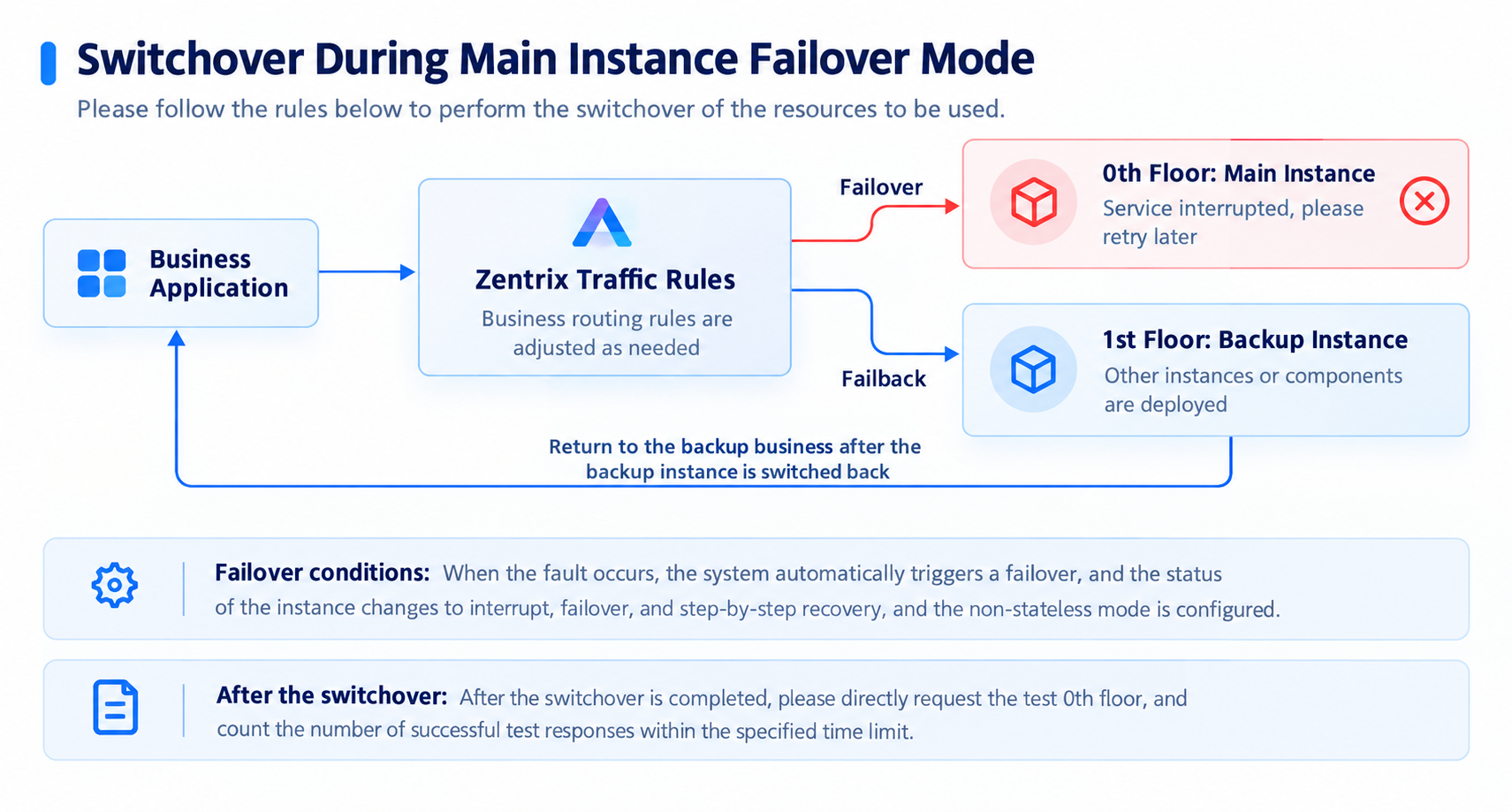
Zentrix failover logic: requests are redirected to the backup target according to rules, and the number of attempts and total duration of each request are capped.
Now let's look at this actual call: DeepSeek is the primary target, and Alibaba Cloud Model Studio qwen-plus is the backup target. Business applications send requests to Zentrix uniformly, and both providers' credentials are stored on the gateway side.
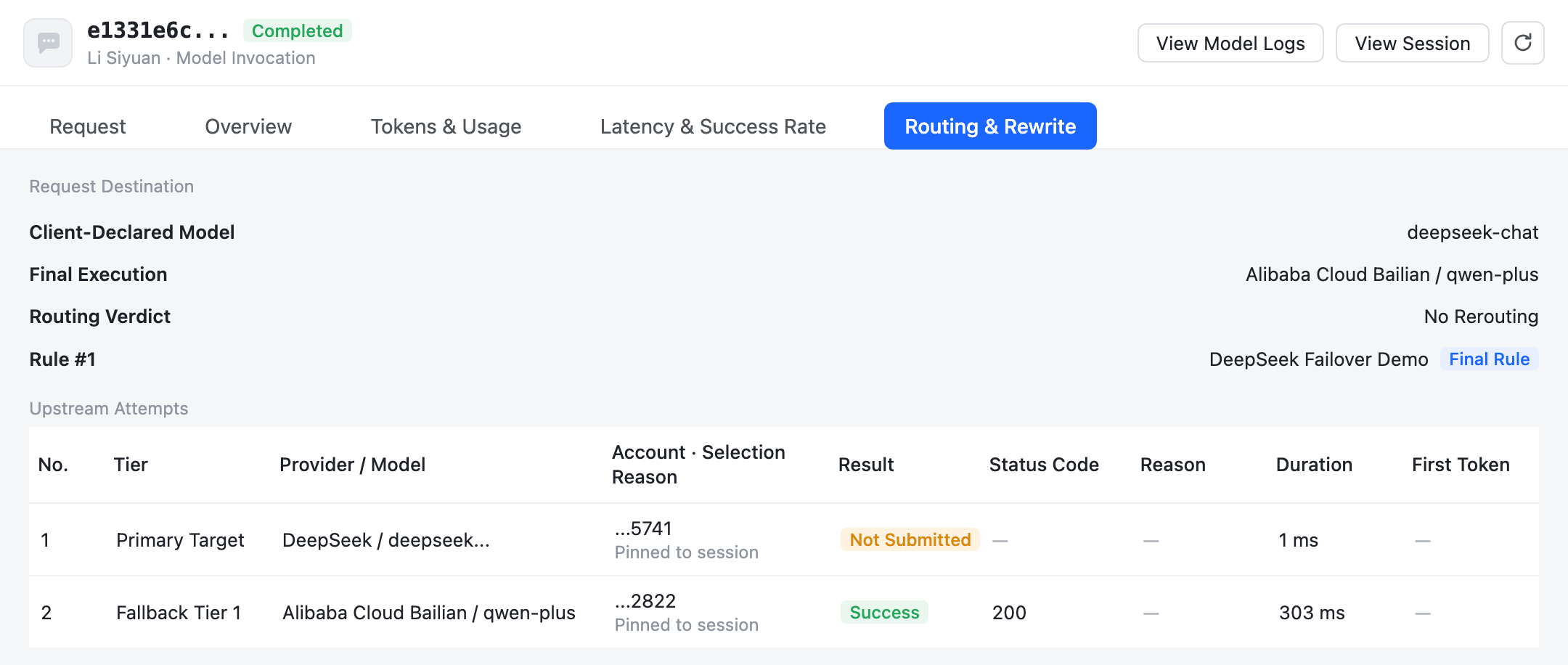
Call record: the client submitted deepseek-chat, and the request was ultimately completed by the backup model qwen-plus.
The client submitted deepseek-chat; the primary target DeepSeek shows "not submitted"; the final execution was Alibaba Cloud Model Studio's qwen-plus, returning status code 200. Zentrix presents the original request, the final model, and the attempt results for each target in a single record.
Once failover rules are configured and the backup model has passed business validation, upstream exceptions can be handled by Zentrix according to rules first — reducing the work of business teams scrambling to find a new provider, modifying interfaces, and waiting for releases.
03 / CIRCUIT BREAKER
During a sustained outage, Zentrix temporarily skips the failing target.
After one request is redirected to the backup model, more requests will keep coming in. If DeepSeek remains down, retrying the primary target, waiting for a timeout, and then switching to the backup model for every single request would repeatedly waste users' waiting time. Zentrix can handle this with circuit-breaker rules.
Once circuit breaking is enabled, when failures reach a configured threshold, the gateway temporarily skips the failing target and routes subsequent requests through the backup path. Administrators don't need to wait for each application to report errors separately and then modify provider configurations one by one. After the primary service recovers, Zentrix runs a preset recovery check to determine whether the original target is available again, and restores calls accordingly.
The switch during an outage, the skipping during a sustained failure, and the switch-back after recovery are all managed on the gateway side. In the real-time traffic record screenshot below, four failovers are recorded, all completed by the backup target; the call counts, results, and latency of the primary and backup targets can each be viewed separately.
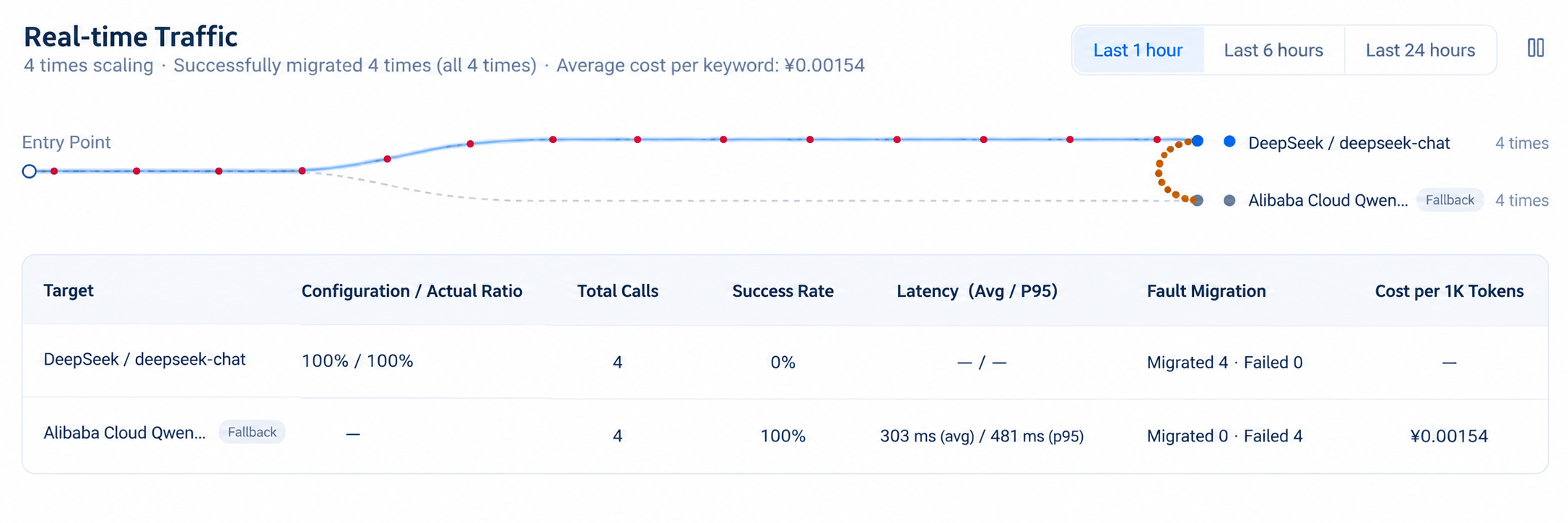
Real-time traffic record: 4 failovers, all completed by the backup target; call counts and execution results for each target are viewable.
On the business side, requests keep getting handled; on the admin side, these records let you check whether the backup model actually caught the requests, and whether there were noticeable latency changes after the switch.
04 / SECURITY & COST CONTROL
After the model switches, security and cost remain managed.
Once requests are handled by the backup model, the next things to confirm are: whether the backup provider can receive the current business data, where the call costs are attributed, and whether this switch left a complete record. These requirements need to be configured together with the backup model.
The backup model's price may differ from the primary model's, but calls after the switch still belong to the original department, member, or application. Zentrix aggregates calls through gateway credentials and their identity attribution, and applies constraints according to the configured quota rules. When administrators adjust the backup model, they can check price and budget at the same time to avoid unclear cost attribution after the switch.
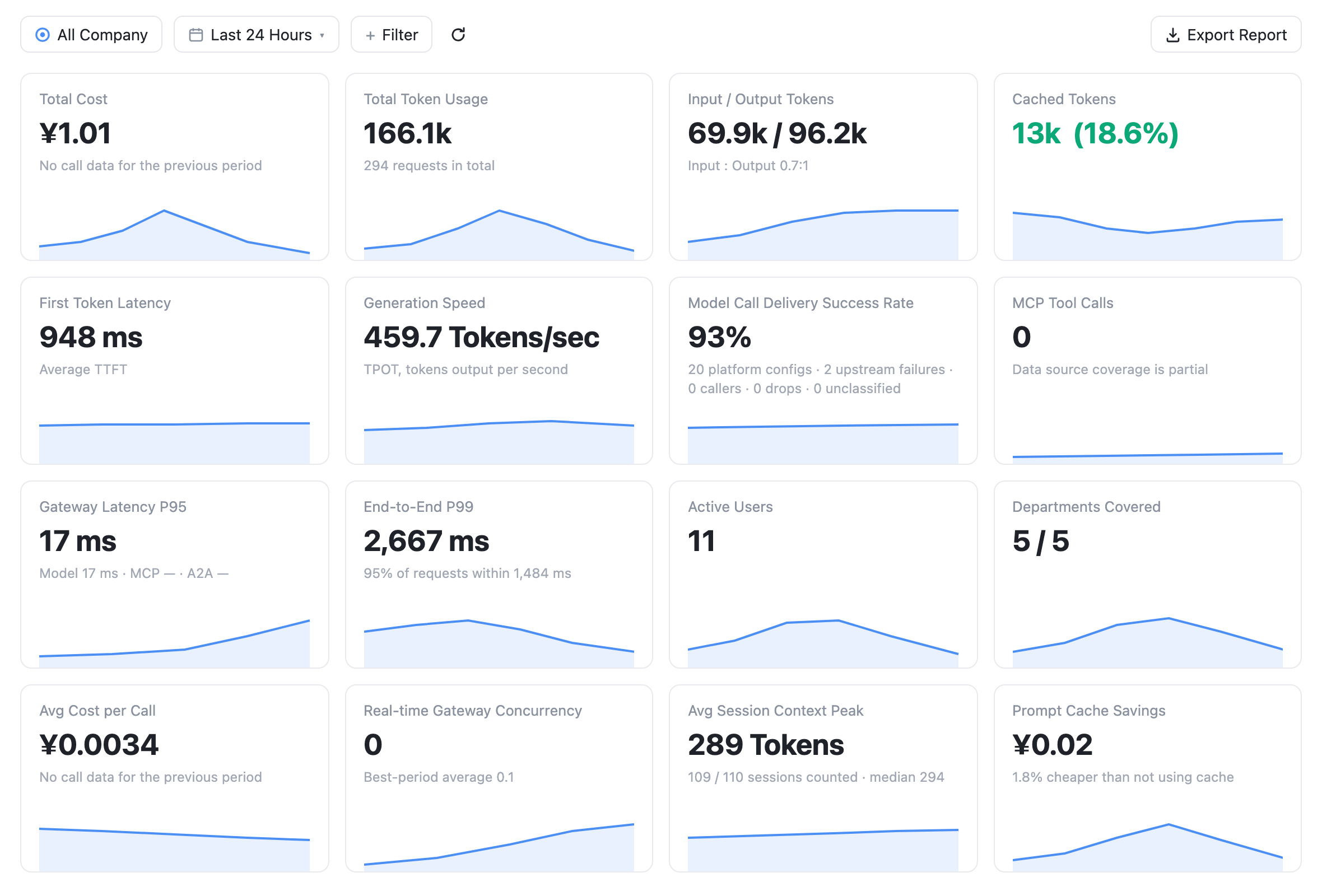
Zentrix gateway overview: view usage, cost, and call results by organization scope and time.
In daily operation, Zentrix's call records help teams see who a request was routed to, whether it ultimately completed, and at which stage a failure occurred. Usage and cost calculated from configured prices support post-incident review, with final spending reconciled against provider invoices. Through these records, teams can also continue to check the backup model's results and response times. If a certain type of task doesn't perform as required on the backup model, adjust the backup choice or the application's handling; if requests take too long, check the timeout and attempt settings. The switch plan also evolves with actual usage.
For requests involving personal information, Zentrix can identify them by rule and apply desensitization or blocking. Content matching the desensitization rule is processed and then forwarded; blocked requests are stopped. For businesses with stricter data-flow requirements, the backup target can be set in advance to an enterprise privately-deployed model, and you can confirm that the corresponding policies cover this call path.
05 / BUSINESS CONTINUITY
Review: build fault handling into everyday access.
That this automatic switch happened when needed depended on the models and rules prepared before the failure. When connecting models in daily operations, you need to define the backup target, configure switch conditions and wait limits, and validate the business results after switching.
The backup model should also be validated with real business tasks. The response format a customer-service system requires, the tool calls a coding assistant relies on, and the context length used in knowledge Q&A can all affect the result after substitution. After the API returns success, you also need to confirm that the application can handle the result correctly. For tasks the backup model still can't complete, the business system should arrange manual handoff or deferred processing in advance.
As more customer-service, knowledge-base, and R&D tools across the enterprise adopt large models, if each team maintains its own provider credentials, interface adapters, and switch logic, an outage at the same provider could trigger changes in multiple places. Zentrix centralizes these model calls into a single entry, letting administrators maintain models and rules on the gateway side while business applications keep a relatively stable integration.
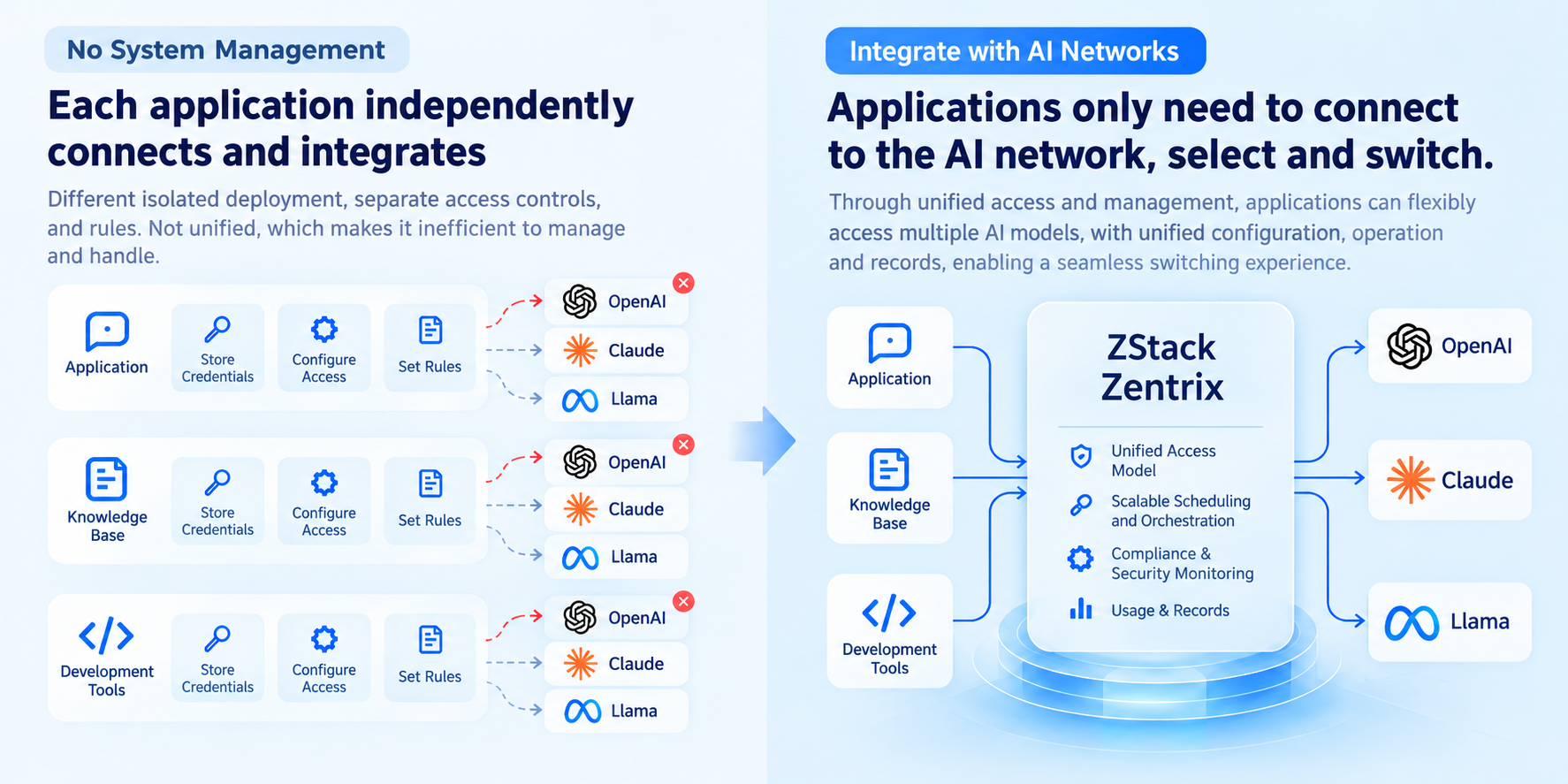
ZStack Zentrix provides enterprises with a unified model-calling entry, managing provider credentials, backup models, traffic rules, and call records in one place. When connecting models in daily operations, you can prepare the failover, recovery mechanism, and corresponding security and quota rules together.
Enterprises can start by picking one business that has already integrated large models, and verify: when the primary model is unavailable, can the backup model take over the task; whether the wait time meets requirements; and whether data, cost, and records after the switch are handled as expected. By making these preparations part of everyday work, when an upstream exception occurs, Zentrix can handle requests according to preset rules, and business teams can more quickly identify issues that still require human intervention.
Contact us to learn how to build model failover and fault-tolerance with ZStack Zentrix — quickly switching to a backup model when the primary model service fails, ensuring stable operation and business continuity for your AI applications.